
Edit your GPX track.
Right on the map.
A free online GPX editor. Move points, cut out a dead end, trim, reverse or simplify the track, then save a new GPX file.
No account · No upload · Works best on a computer

Open a file, fix it, save it.
No sign-up and nothing to install. The editor opens in your browser tab.
- 1
Open a GPX file
Drop it on the map or pick it from your computer. Or draw a new track from scratch.
- 2
Fix the track
Drag points, cut what you don’t need, reverse the direction. Every step can be undone.
- 3
Save a new GPX
Ready for your phone, your bike computer or any app that reads GPX.
Tools for fixing a track.
Made for fixing a route before a ride or a hike, not for GIS work.
View a GPX on a map
See the whole track with distance, climbing, descent and the number of points.
Move, add, delete points
Drag a point to move it. Drag the dot between two points to add one.
Cut out a dead end
Draw a box around a wrong turn and delete it. The points on either side join up.
Trim the start or the finish
Click a point and drop everything before it, or after it.
Reverse a GPX route
Ride or walk the route the other way round, in one click.
Simplify the track
Fewer points, same shape. A slider shows how many points you keep.
Snap to roads and paths
Moved and drawn points jump onto the nearest road or trail on the map.
Draw or extend a track
Click on the map to add points at the end, or start a new track from nothing.
Elevation profile
See every climb under the numbers and point at one to find it on the map. New points get their elevation from the terrain.
Out and back
Turn a one-way track into a return trip on the same roads. If the finish is already near the start, it closes the loop.
Kilometres and direction
Numbered dots mark the kilometres and small arrows show which way the track goes.
Send it to your iPhone
Scan a QR code with your iPhone: the track opens there, and one tap adds it to trop. It travels in the link, never through a server.


Then follow it in trop.
Open it in trop.
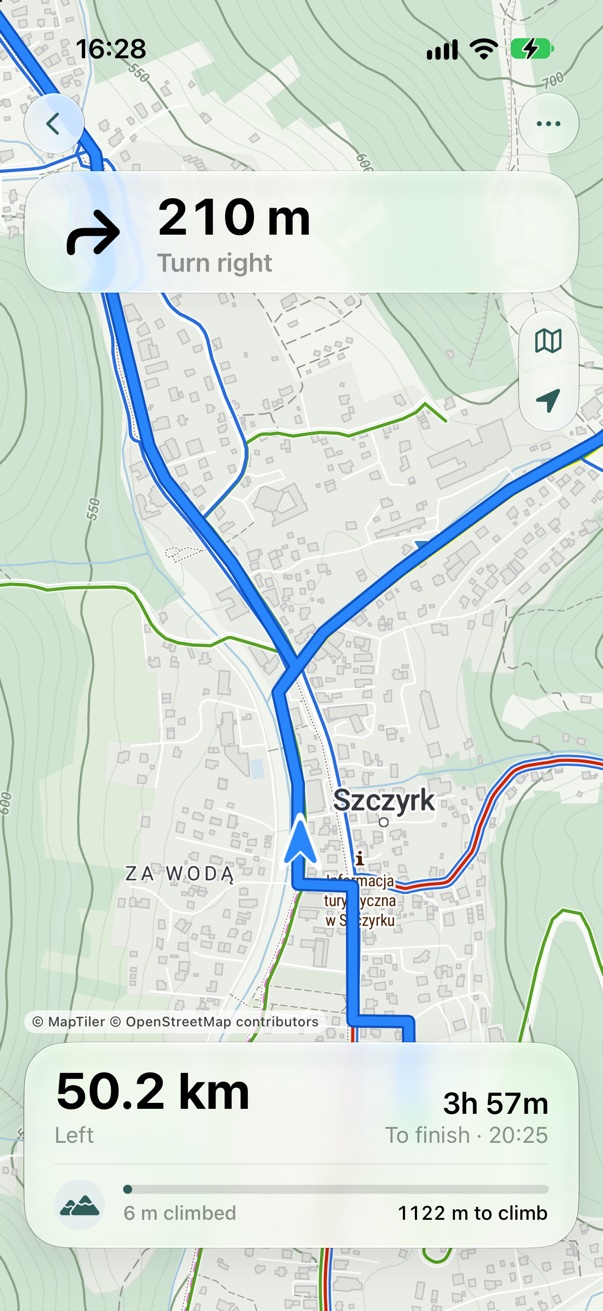
trop. is our iPhone app for following a GPX track, by bike or on foot. Click Send to trop. and scan the QR code with your iPhone: the track opens on the phone, and one tap adds it to trop. Or send the saved file with AirDrop or the Files app.
- The next turn at the top, distance to the finish at the bottom
- A warning and an arrow back when you leave the route
- Offline maps, no account
iPhone · iOS 26 or later · coming soon to the App Store
Your file never leaves
your device.
No upload
The GPX is opened and edited in your browser. Only the map itself comes from the internet.
No account
Open the page and start editing.
Your work is kept
An unsaved track waits for you as a draft in this browser.
Free
No trial, no limits, no ads.
Details: privacy policy.
FAQ
Is the GPX editor free?
Yes. No account, no trial and no limits.
Is my GPX file uploaded anywhere?
No. The file is read and edited in your browser and stays on your device. Only the map itself is loaded from the internet.
How do I cut part of a GPX track?
To remove a stretch in the middle, choose Area and draw a box around it, then Delete. To shorten the start or the finish, click a point and choose Trim before or Trim after.
How do I reverse a GPX route?
Open the file and click Reverse. Save, and the new GPX goes the other way round.
How do I reduce the number of points?
Click Simplify and move the slider. You see how many points are left before you apply it, and the shape stays the same.
Why is the climbing different from another app?
Apps count climbing in different ways, for example some ignore small bumps. Totals often differ by a few percent, and that is normal.
How do I get the GPX onto my iPhone?
Click Send to trop. and scan the QR code with your iPhone camera: the track opens in the editor on your phone, one more tap adds it to trop. Or save it and send it with AirDrop or the Files app.
Does it work on a phone?
Yes, the tools sit in a sheet at the bottom. A computer with a mouse is more comfortable for precise edits.